Skip to content

Delectable · Linux · Windows · macOS pre-releases

Your Delicious Library, back on the shelf.

Delicious Library stopped at the end of 2024. Delectable opens its library file and gives you your shelves back, then adds what a shelf app never had: search by title in any language, scores, cast and where to watch.

Not affiliated with or endorsed by the makers of Delicious Library.

~3,000Films imported in under a minute
0Changes to your original file
Scroll

Why it exists

The app stopped. Your library did not.

Delicious Library was a much-loved Mac app: books, films, music and games on virtual wooden shelves. Its maker ended it at the end of 2024. It is no longer sold or updated. Three situations Delectable is for.

The years in a file nobody can open

TodayYour catalogue sits in a Delicious Library file. The app that reads it is no longer sold or updated, and you cannot count on it running on your next computer.

With DelectableYou point it at the file. Items, covers, notes, shelves and ratings come across, and the original stays as it was.

What you gain — the cataloguing you already did, instead of starting again.

The entries with only a title

TodayYears of entries typed in a hurry: a title, no director, no cast, no summary. You cannot search them by actor, and you do not remember what half of them are about.

With DelectableOne button completes an item, or every empty one in the library. It fills what is missing and never replaces what you typed.

What you gain — a library you can search by who made it and who is in it.

The collection tied to one app

TodayYour library lives inside a program. When the program stops, so does your access to what you spent years building.

With DelectableThe library is a folder on your disk: one SQLite file and a folder of covers. No account, no cloud.

What you gain — a library that is plainly yours, in a format other tools can read.

For anyone with a few hundred shelved books, discs and records who still wants to know what they own, and who has it on loan.

Compatible

Bring the library. Keep the shelves.

Choose your Delicious Library 3 file and Delectable reads it directly. We have run it on a real library of about 3,000 films: it took under a minute.

In Delicious LibraryIn Delectable
Title, subtitle, type, format, pages, barcode, ratingCarried over
Creators, writers, cinematographers, composers, conductors, illustrators“Made by”, in that order, without duplicates
Actors“With”, the cast
A year typed in the creator fieldRelease date
Notes, or your own synopsisNotes
Covers (JPEG, PNG, GIF, JPEG 2000, TIFF)Copied as they are, or converted when a browser view cannot show them
Your shelves and what is on themShelves
Identifiers, creation and modification datesKept
Loans in progress, wish list, XML exportNot imported yet
~3,000Films imported in under a minute
0Changes made to the original file
2×Import twice, nothing is added twice

Concretely — you choose the file, watch a progress bar for the items, then for the covers, and read a short report: how many items came across, how many were already there, how many shelves. If something looks off, run it again. Nothing doubles.

What is new

The shelf, and what a shelf never knew.

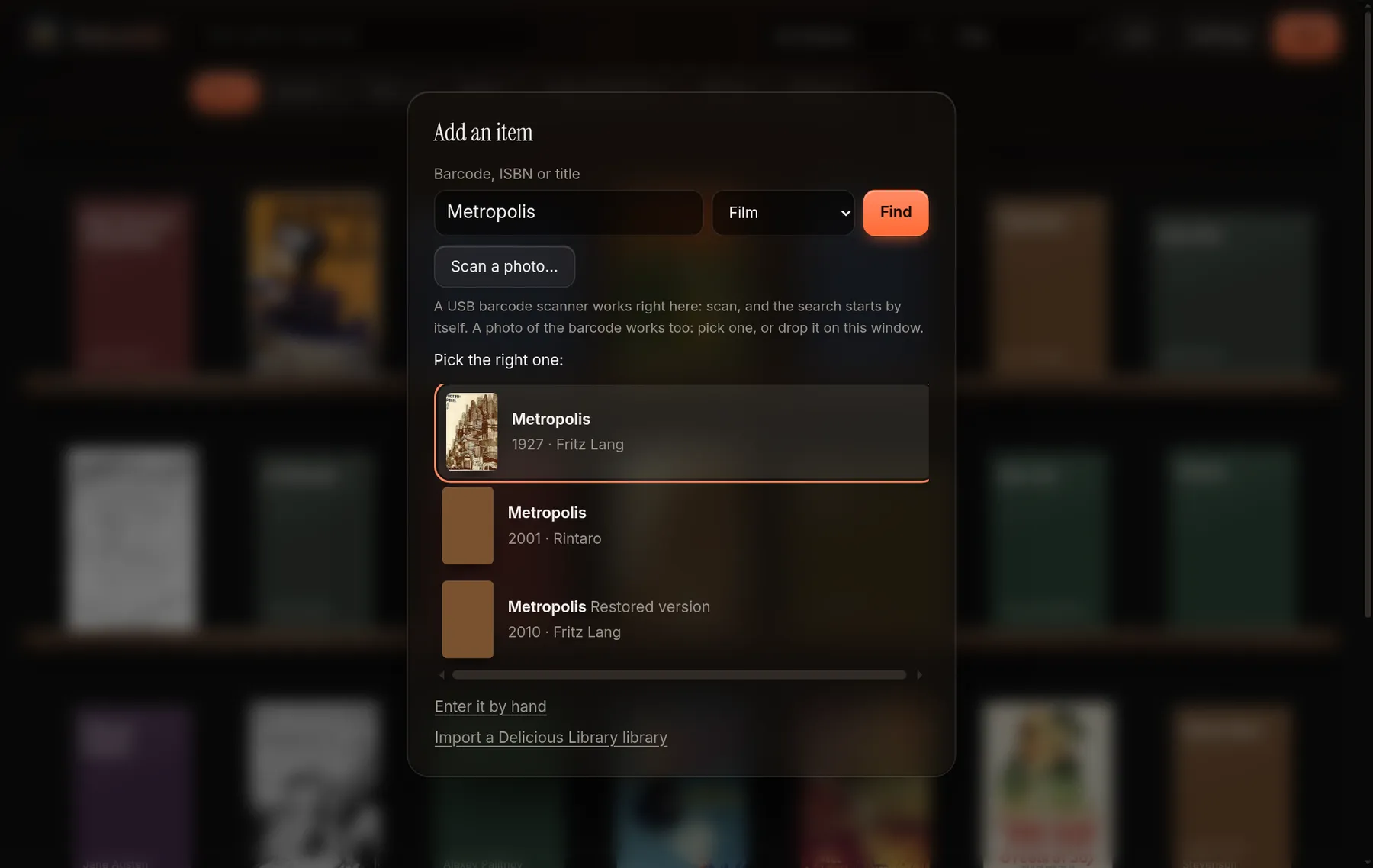
Type a title, in any language, and pick the right one from the results. The details and the cover arrive on their own.

The add dialog in Delectable: a title typed in the search field and three results to pick from, the first with its poster
Add by title or barcode. Pick the right result and the details and cover arrive on their own. A barcode can be typed, scanned with a USB scanner or read from a photo of the case.
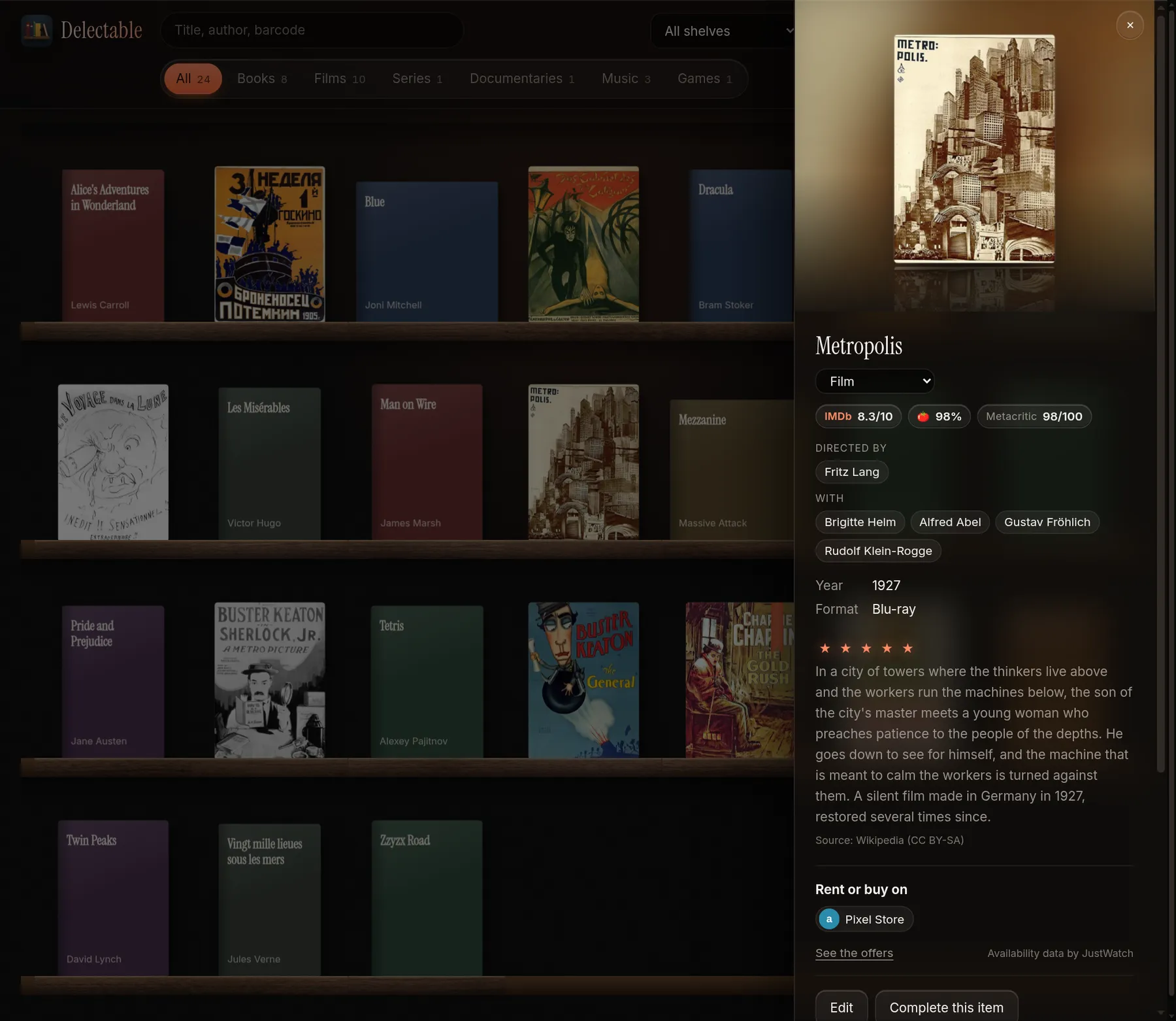
An item page in Delectable: review scores, director, cast, summary and where to rent or buy
An item page. Review scores, who made it, who is in it, a summary, and where to watch or buy in your country.

Screenshots show the real app on a demo library of public-domain films. The posters are public domain; the scores and the summary are sample data.

01

Title in any language

Type a title and choose from the results. The language you set for the app is also used for the titles and summaries it fetches.

02

Barcodes

ISBN-10 and 13, EAN-13 and UPC-A, typed or scanned, with the check digit verified. Or read it from a photo of the case.

03

Free sources

Films and series, books and records are looked up in free sources, with no account to open. A key for TMDB, if you have one, goes in front for films.

04

Scores, summary, cast

IMDb, Rotten Tomatoes and Metacritic scores when they are known, a summary with its source shown, and the cast on every item page.

05

Where to watch

Streaming, rental and purchase options for the country you choose. Asked when you open an item, never stored. It needs a TMDB key.

06

Complete an item

Fills what an item lacks, without ever replacing what was typed. “Complete empty items” does it for the whole library, one by one, and you can stop it.

07

Search by person

Who made it and who is in it are separate on the item page and in the search: look for “De Niro” and his films come up.

08

Edit, rate, lend

Edit every field, change or remove a cover, add notes and a rating out of five. Note who has an item, since when, and when it came back.

09

Yours, offline

One SQLite file and a covers folder, on your disk. Once the library is filled, it works without a network. French and English, with themes.

Where it runs

On your computer. Nowhere else.

Delectable is a desktop app. Here is what exists today and what does not.

Linux, Windows, macOS

Pre-release builds for testers. This is what early access gives you.

Android

In progress. There is no Android app today.

iPhone

Planned. There is no iPhone app today, and we give no date.

Frequently asked

Before you import.

Will it open my Delicious Library file? +
Yes. Delectable imports a Delicious Library 3 library file directly: items, covers, notes, shelves and ratings. Nothing is modified in the original file, and importing the same file twice adds nothing.
Is everything carried over? +
Not yet. Loans in progress, the wish list and the XML export are not imported. Everything else in the table above is.
Are you the makers of Delicious Library? +
No. Delectable is made by Carnival DevOps and is not affiliated with or endorsed by the makers of Delicious Library. We use the name only to say what Delectable replaces and what it imports.
Where is my library stored? +
In a folder on your own disk: one SQLite file and a folder of covers. There is no account and no cloud.
Does it work offline? +
Once the library is filled, yes. Looking up a title, a score or where to watch needs a network; browsing, searching, editing and lending do not.
Which systems does it run on? +
Linux, Windows and macOS builds exist as pre-releases for testers. An Android version is in progress and an iPhone version is planned. Neither exists yet, and we do not give dates.
How do I get it? +
Write to us for early access. There is no public download yet, and no price has been set.
Which languages does it speak? +
The interface is in French and English. The language you choose is also used for the titles and summaries it fetches.

Early access

Bring us your shelves.

Tell us which system you use and roughly how big your library is. We reply with how to get a pre-release build.

Bangkok · UTC+7Linux · Windows · macOS pre-releasesNot affiliated with the makers of Delicious Library